Knowing Kubernetes nouns individually is not the same as understanding how an EKS platform operates. Pods, Ingress, Karpenter, Terraform, and Argo CD are easy enough to define one at a time; the useful lesson is watching them cooperate.
This playground follows the keyless CI work from earlier in the infrastructure series. Terraform establishes the AWS and cluster foundation. Argo CD continuously reconciles Kubernetes manifests. Karpenter supplies application capacity dynamically. The result is a disposable learning environment, not the home lab’s next hardware revision and not a production reference architecture.
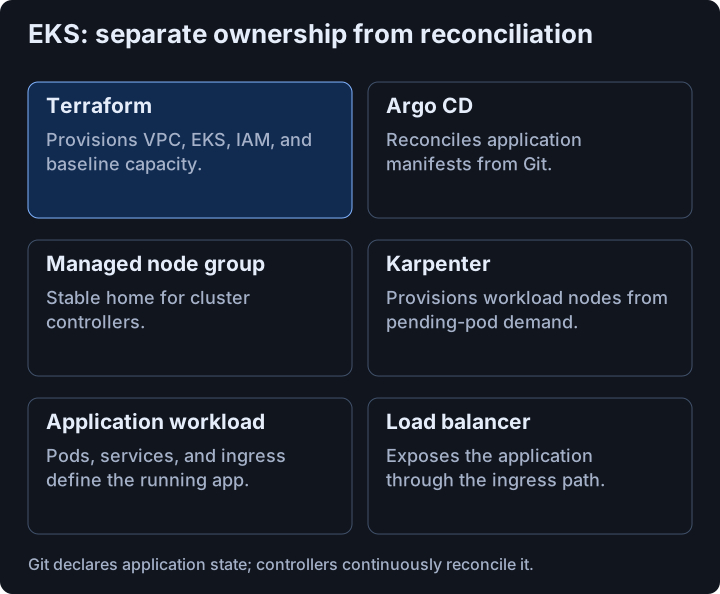
Divide stable operations from elastic workloads #
The stack uses:
- Terraform for VPC, EKS, IAM, and cluster add-ons;
- EKS as the managed Kubernetes control plane;
- Karpenter to provision nodes that fit pending workloads;
- Argo CD to reconcile application and operations manifests from Git;
- AWS’s 2048 sample application as a visible workload.
Argo CD and Karpenter must continue running while Karpenter changes application capacity. They therefore live on an EKS managed node group labeled for operational workloads. Application pods land on the dynamic NodePool.
That small separation prevents a pleasing recursive failure: the autoscaler should not evict the infrastructure required to run the autoscaler.
Let controllers discover the network #
The VPC spans three availability zones with public and private subnets. Tags turn those subnets into discoverable inputs for controllers:
private_subnet_tags = {
  "kubernetes.io/role/internal-elb" = 1
  "karpenter.sh/discovery"          = local.cluster_name
}
The AWS Load Balancer Controller uses Kubernetes Ingress and Service resources to create ALBs or NLBs. Karpenter uses its discovery tag when choosing where to launch instances. The tags are part of the API between Terraform-owned infrastructure and Kubernetes controllers; deleting them is not tidying up.
Pin the platform pods #
The managed node group carries labels that identify it as the stable operations pool:
eks_managed_node_groups = {
  ops = {
    ami_type       = "BOTTLEROCKET_x86_64"
    instance_types = ["m5.large", "t3.medium"]
    capacity_type  = "SPOT"
    min_size       = 1
    max_size       = 3
    desired_size   = 2
    labels = {
      "workload-type"            = "ops"
      "karpenter.sh/controller"  = "true"
    }
  }
}
Argo CD and Karpenter use nodeSelector to target those nodes. The sample app uses Karpenter-managed capacity. An ALB with target type ip sends traffic directly to pod addresses rather than bouncing through instance ports.
Git is the desired state #
Argo CD ApplicationSet resources point at the repository directories containing operations and application manifests. With automated sync enabled, a commit changes desired state and the controller reconciles the cluster.
spec:
  template:
    spec:
      project: default
      source:
        repoURL: https://github.com/reiichii/EKS-de-asobo
        path: argocd_apps/ops_manifests
        targetRevision: main
        directory:
          recurse: false
This lab is deliberately cloud-hosted, separate from the smaller home environment described elsewhere in the notebook. The shared progression is operational: first establish short-lived CI identity, then build a cluster whose infrastructure and workloads are both declared, reviewable, and repeatable.